Sales price formation for Odoo, from invoice cost to real margin
An app standard Odoo does not have: it sets sales prices from the real cost of each purchase, taxes, fees and fixed costs, shows before and after for every product and only applies when you approve. It was born in OdooPME, our management solution, and is now available for any Odoo 20.
- Odoo 20 Community
- Odoo 20 Enterprise
- Integrated with purchase NF-e
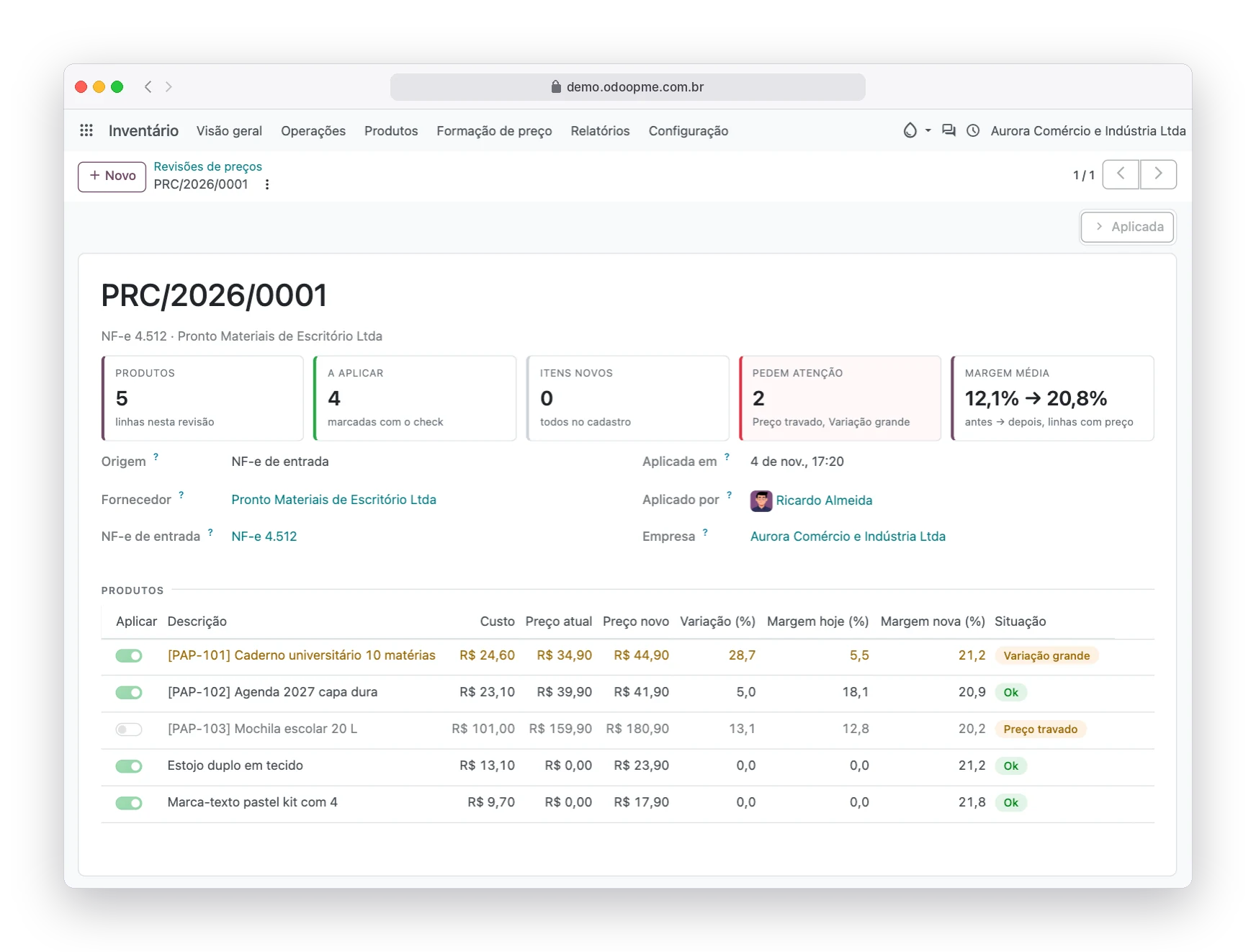
Real system screens with fictitious demo data.
Profit disappears quietly, one product at a time
Nobody decides to lose margin. It slips away between a supplier invoice and the month-end close, and nobody notices.
The invoice nobody read
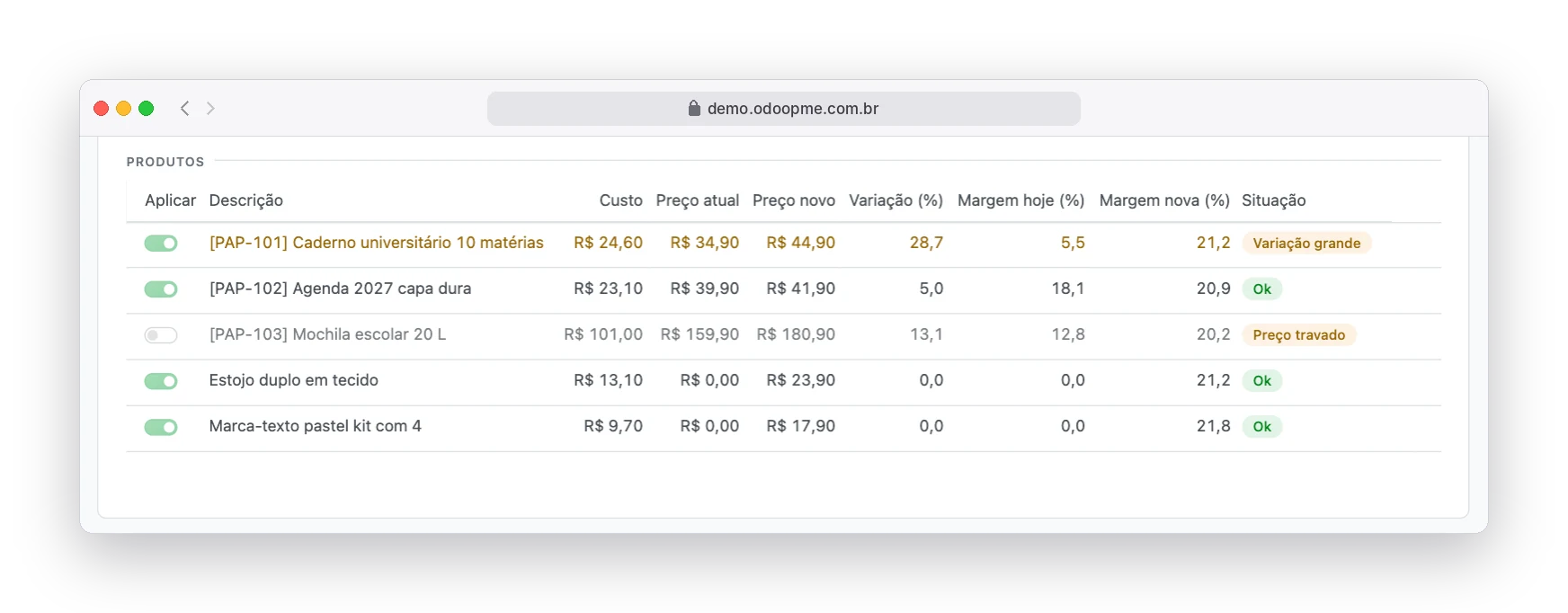
The notebook that cost R$ 18.40 now costs R$ 24.60. The shelf price is still R$ 34.90 and the margin dropped to 5.5%.
The "cost + 40%" rule of thumb
It looks like profit. But after taxes, card fees and rent, a R$ 50.00 product sold at R$ 70.00 leaves only R$ 3.20.
The side spreadsheet
Someone recalculates everything in Excel, types it into the system product by product, and nobody can tell who changed which price, or when.
The new item that blocks receiving
The invoice brings a product that is not registered and the purchase stalls, without saying which one or at what price to sell.
Why "40% on top of cost" is not 40% profit
Taxes, card fees, commission and fixed costs are charged on the price the customer pays, not on what you paid the supplier. Change the numbers to match your store and compare.
Divisor markup formula: price = cost ÷ (1 − sum of percentages ÷ 100), rounded up to the next .90 ending. Illustrative values.
R$ 50.00 cost and 24% of the price in costs
| How the price was set | Price | Sales costs | Left over | Real margin |
|---|---|---|---|---|
| Cost + 40% | R$ 70.00 | R$ 16.80 | R$ 3.20 | 4.6% |
| Cost + 100% ("double it") | R$ 100.00 | R$ 24.00 | R$ 26.00 | 26.0% |
| Divisor markup with 20% profit | R$ 89.90 | R$ 21.58 | R$ 18.32 | 20.4% |
From supplier invoice to shelf price, with you in control
Everything lives in the Inventory app, under the Price formation menu. The system does the math, shows before and after, and waits for your decision.
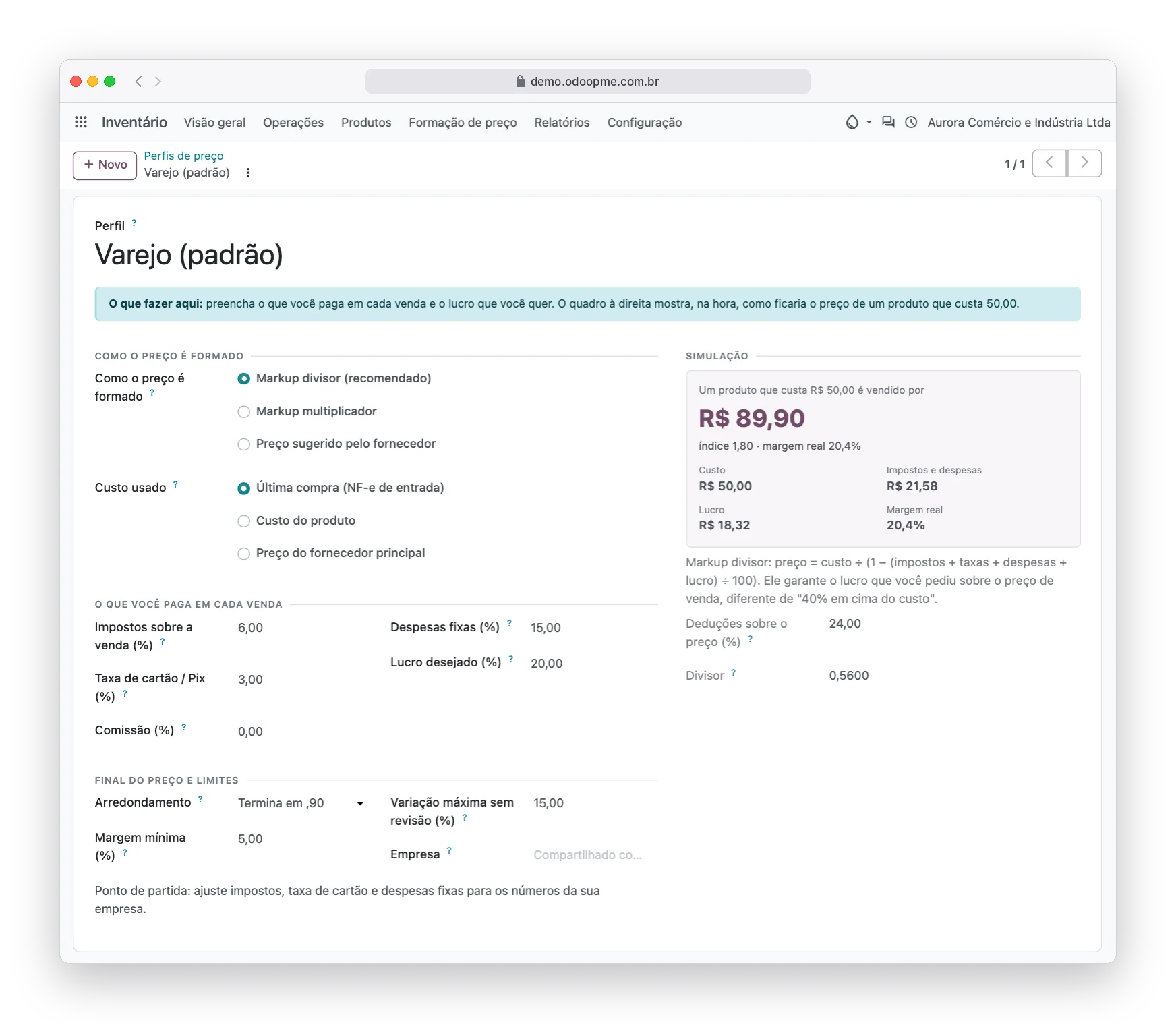
The pricing recipe: the profile
You enter what each sale costs you and the profit you want. As you type, the simulation shows the price, what goes to taxes and costs, and the real margin.
- Divisor markup, multiplier markup or supplier suggested price
- Cost from the last purchase invoice, product cost or supplier price
- Commercial endings .90, .99 or whole, always rounded up
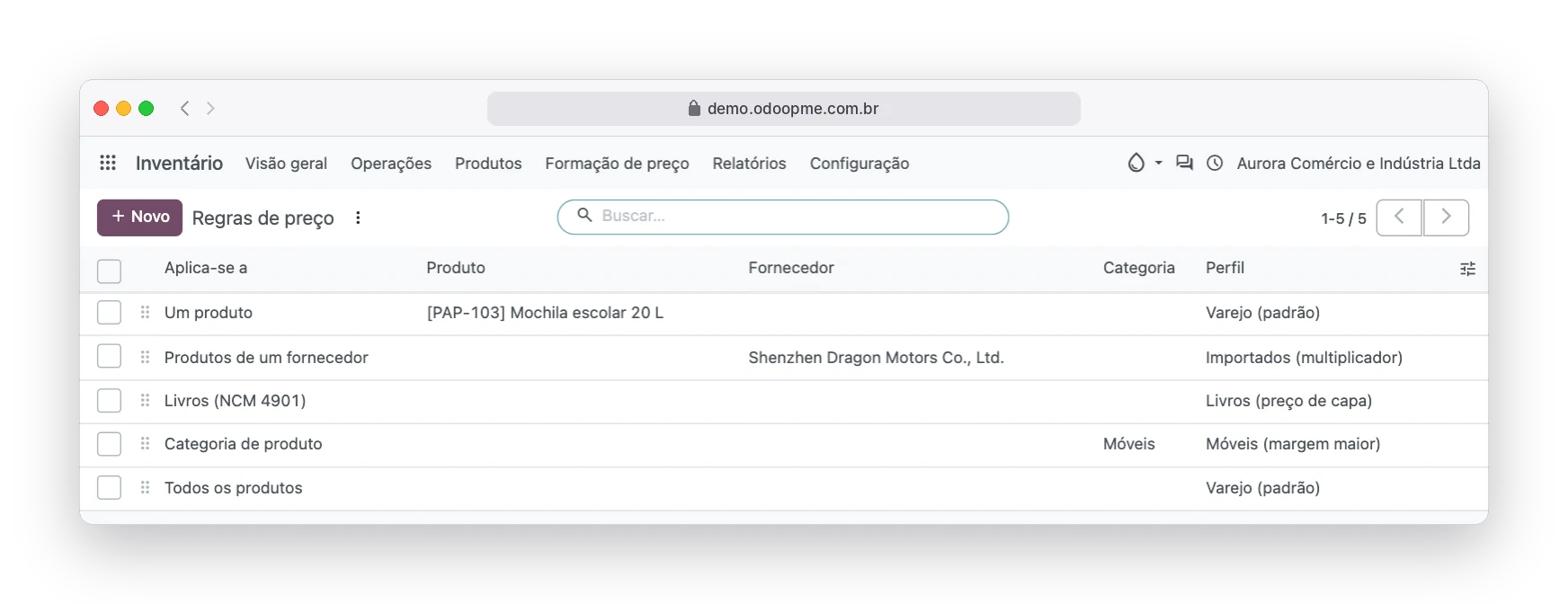
Each product group with its own margin
Furniture moves slowly, imports follow an index, books follow the cover price. Rules say which profile each group uses, and the most specific one wins.
- By product, by supplier, by category (with subcategories)
- Books recognized by NCM code 4901
- Ready out of the box: Retail (default) and Books (cover price)
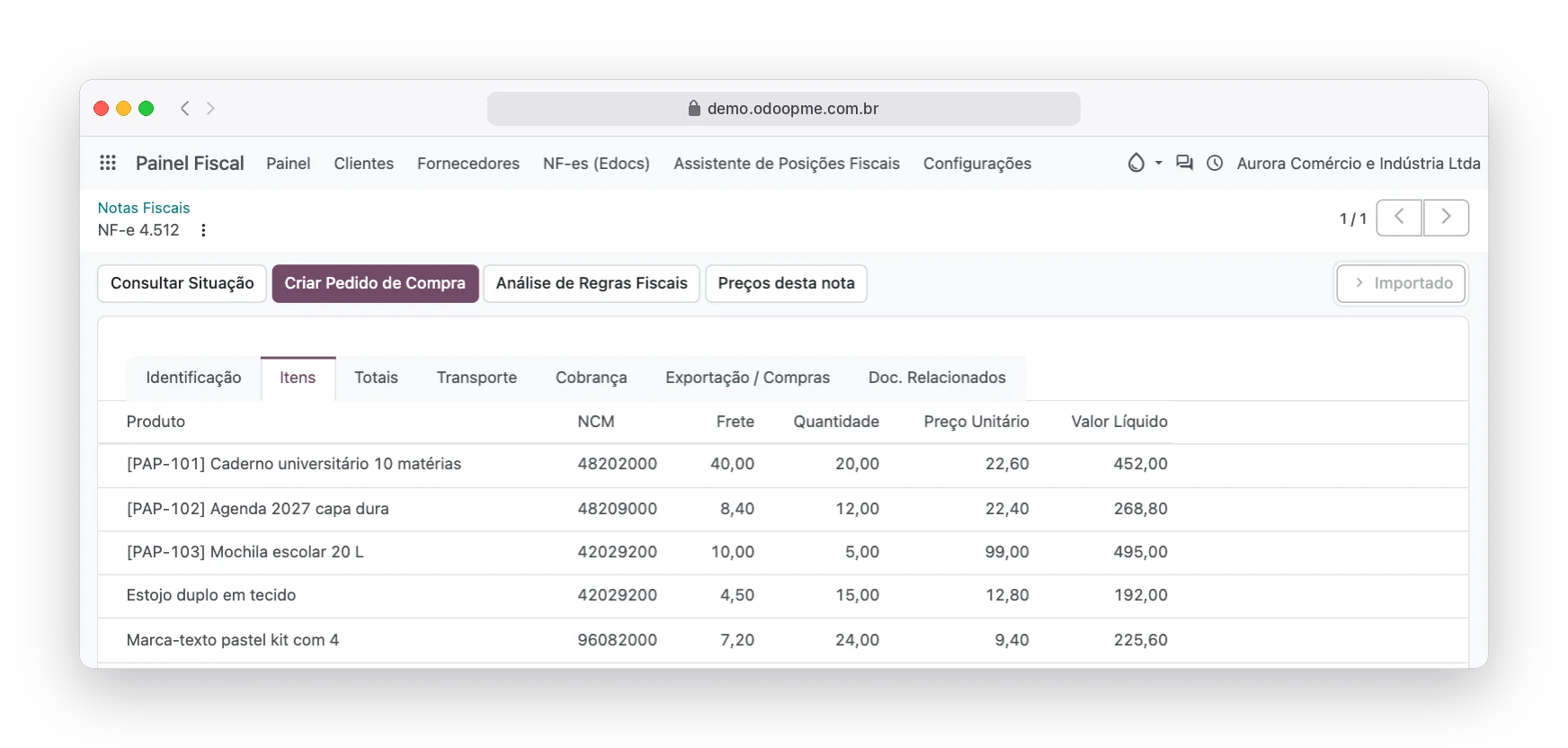
The invoice arrived: this invoice's prices in one click
The imported purchase invoice (NF-e) gets a Prices for this invoice button. When it brings items that are not registered, a New items to register button shows up too.
- Real line cost: product + freight, insurance, other expenses, IPI and ICMS-ST, minus discounts
- New item created with name, barcode, NCM and supplier from the XML
- A repeated barcode becomes a link, not a duplicate record
The review: from → to, before anything changes
One line per product, with new cost, current price, new price, change and margin today versus with the new price. Type a different price and see the margin instantly.
- Large changes and below-minimum margins come unchecked: your call
- Only checked lines change when you click Apply prices
- Price and cost go to the product and into the history
On the product: suggested, automatic or locked
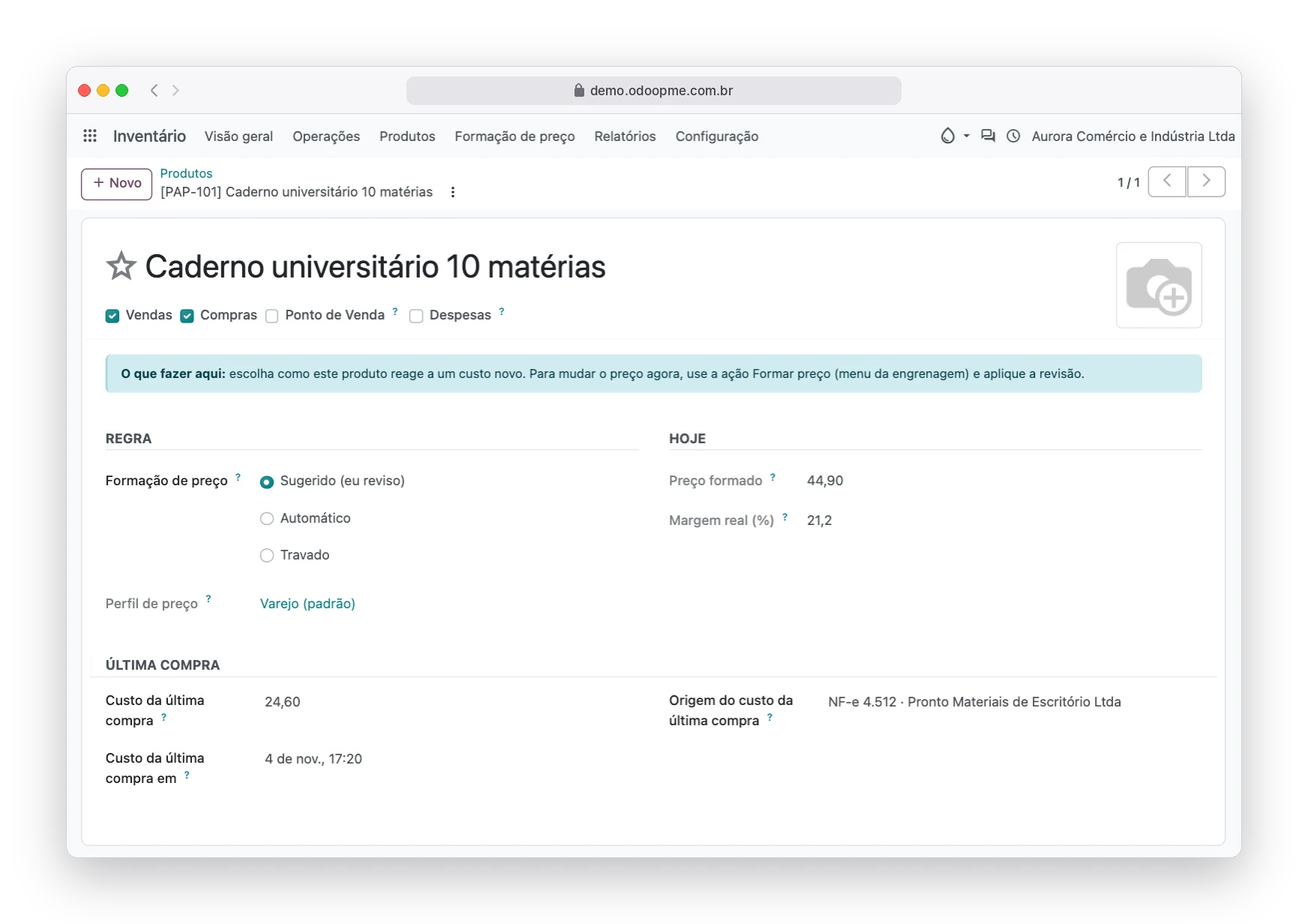
The Price formation tab shows the profile picked by the rules, the price it would set today, the real margin and the last purchase cost. And it defines how the product reacts to a new cost.
- Suggested: the price waits in the review for you to apply
- Automatic: the line comes checked, even with a large change
- Locked: campaign or showcase prices never change on their own
History: who changed it, when and why
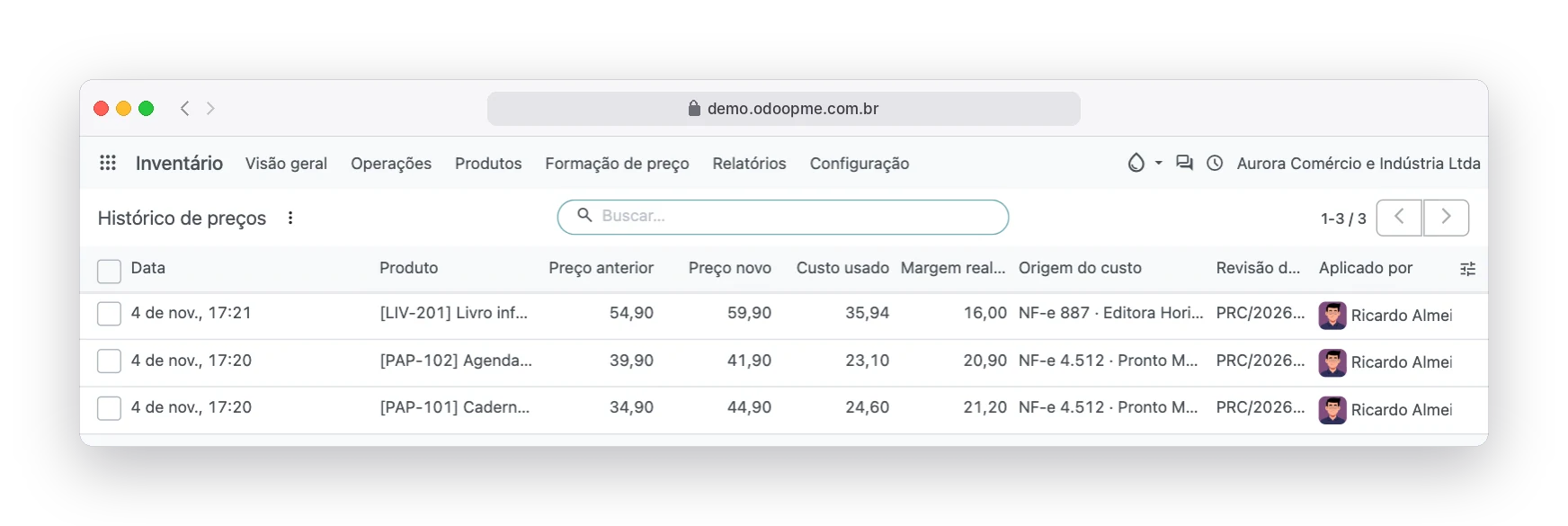
Every applied price is recorded with old and new price, cost used, real margin, source invoice, review and user.
- Price changes button right on the product
- Repricing without an invoice: select products and run Set price
- An applied review is final: to change again, run a new review
Eight situations you see without doing any math
Within the profile limits. Comes checked.
Beyond the maximum change, up or down.
The new price real margin is below the minimum.
The new price is lower than the cost.
The product takes no automatic price; it only shows the new margin.
The new price equals the current one.
Zero cost: no price can be set.
Not registered yet. Register it before applying.
For books, the cover price rules
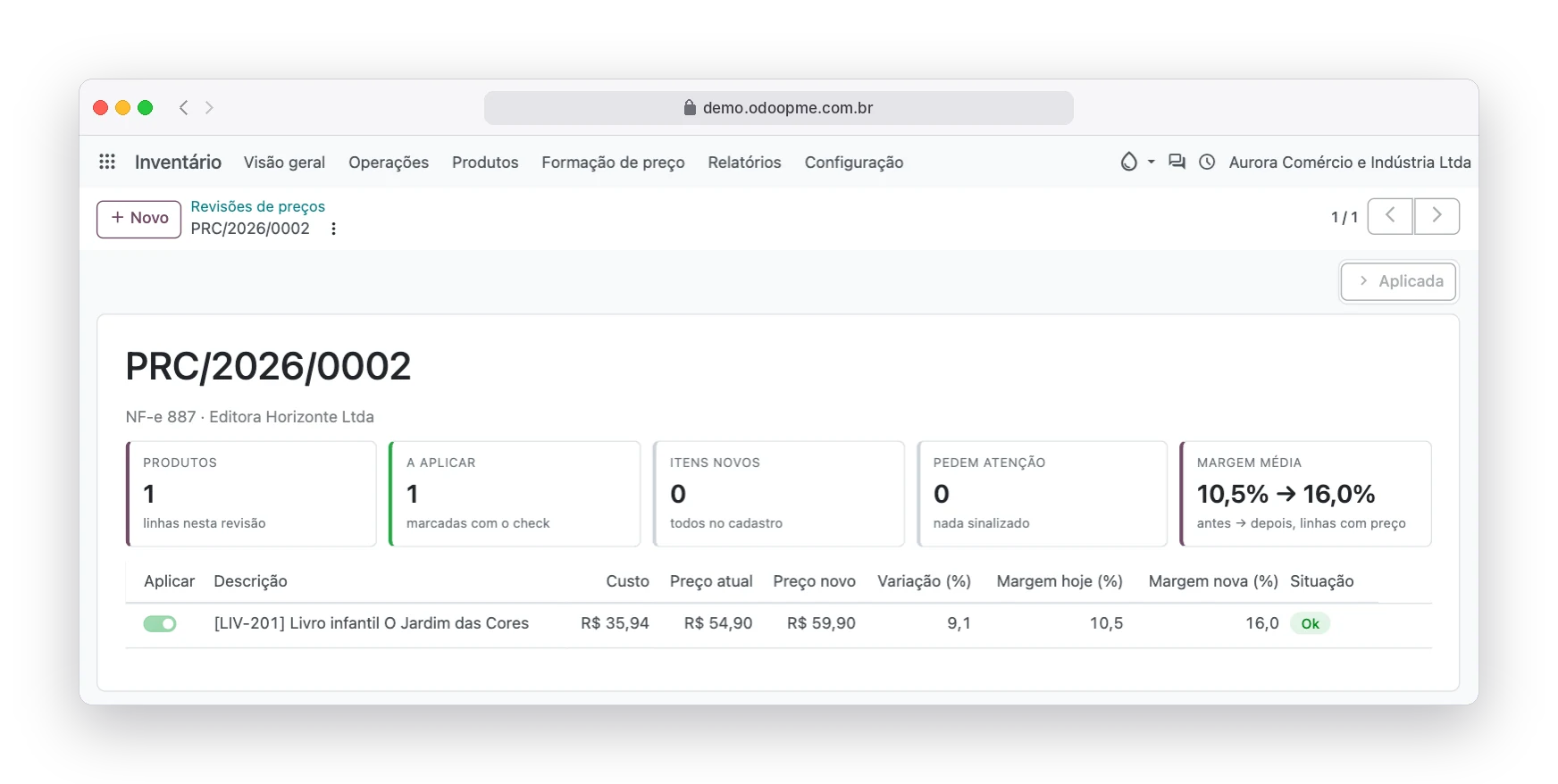
The publisher sets the cover price and invoices with a discount. The Books (cover price) profile reads the gross invoice value as the cover: the R$ 59.90 book with a 40% discount costs R$ 35.94, the price goes from R$ 54.90 to R$ 59.90 and the screen shows the margin left, 16.0%.
Invoice without discount? The system keeps the current price and flags it if the margin drops.
An app born from what retailers really needed
OdooPME is Edoo's management solution for small and mid-sized Brazilian businesses. Our customers, retailers, bookstores and distributors, kept asking for the same thing: stop recalculating prices in a spreadsheet on every supplier invoice. Odoo has pricelists, but it does not set the price from the real cost with taxes and fixed costs, nor show the margin before applying. We built Price Formation for OdooPME and, once proven in daily use, turned it into an app for any Odoo 20, Community or Enterprise.
- Built and maintained by Edoo Tecnologia
- Proven with OdooPME customers
- Odoo 20 Community and Enterprise
Two modules that work together
Price Formation
Price profiles, rules, reviews, product modes, Set price action on the product list and price history. Works with product cost or supplier price.
Price Formation · Purchase NF-e
Connects price formation to the purchase NF-e import of the Edoo tax apps: real line cost, Prices for this invoice and New items to register buttons, and item creation from the XML.
What the system will not let happen
Nothing changes without your click
No price reaches the product until someone clicks Apply prices. Discarding a review changes nothing.
No duplicate records
A new item is not applied before it is registered, and a repeated barcode never becomes a second product.
Locked means locked
A product in Locked mode never changes price on its own. The review only shows the new margin.
Impossible math is refused
A profile whose percentages add up to 100% of the price or more is refused, because no price could cover it.
Full audit trail
The change is logged on the product, the review and the invoice, with user and date.
Works across every channel
The applied price goes to the Sales price used by sales, POS, the online store and pricelists based on it.
Built for businesses that buy with invoices and sell over the counter, at the POS or online
Retail and stationery
Hundreds of items, cost changing on every invoice.
Bookstores and publishers
Cover price and margin from the publisher discount.
Furniture and decor
Slow turnover needs a higher margin, in one rule.
Imported goods
Multiplier markup per supplier, with the real margin in sight.
Building materials
Freight and ST that eat margin go into the cost.
Fashion and footwear
Segment index, locked showcase prices.
Full step-by-step guide, with every screen
Profile fields, pricing methods, rules, review, books, product modes and FAQ in the official guide.
Official guide in Portuguese, updated with every releaseQuestions about price formation
Does the cost include freight and invoice taxes?
Yes. Each line unit cost is the product value plus freight, insurance, other expenses, IPI and ICMS-ST, minus discounts, divided by quantity.
Why is the price slightly above the calculation?
Because rounding always goes up to the next ending chosen in the profile, so the commercial ending never reduces the margin you asked for.
Can I change the suggested price before applying?
Yes. Type the value in the line New price: change, margin and status are recalculated instantly.
Which percentages should I use?
Your own numbers: the effective tax rate comes from your accountant, the card fee from your terminal statement, and fixed costs are the monthly total divided by monthly revenue.
Do I need an invoice to reprice?
No. In the product list, select the items, open the Actions menu and choose Set price. The system creates a review with those products and the rest is the same: check, tick and apply.
I have more than one company in the system.
Profiles and rules can belong to one company or be shared with all of them by leaving the Company field empty.
Does the new price apply to the online store and POS?
Yes. The applied price goes to the product Sales price, used by sales, POS, the online store and pricelists based on it.
Does it work on Odoo Community?
Yes. The modules are available for Odoo 20 Community and Enterprise.
Do I need the Edoo tax apps?
Only for the purchase NF-e part. Without them, price formation works with product cost or supplier price and the Set price action on the product list.
Bring Price Formation to your Odoo 20
Talk to Edoo to install the modules in your environment, Community or Enterprise, and set up profiles with your company's numbers.